
Friday, November 02, 2012
I'd run out and buy a Livescribe Sky pen except for ...
I'm still nerding out on Evernote at the moment ... and have been hearing good things about the new Livescribe Sky wifi 'smartpen' ... that works with Evernote.
I really like the idea of a pen that captures my notes and can capture audio too ... I really like that idea.
In fact I'd run out and buy a Livescribe Sky pen right now if it wasn't for one key factor ... the paper I have to write on.
Livescribe have their own paper ... it features coding that works with the pen ... start / stop ... that kind of thing. To use this 'smartpen' I need to use their 'smartpaper'.
This is a deal breaker for me.
Why? Moleskines and Post-it Notes ... that's why.
Or I should be less brandy and say ... notebooks and stickynotes.
I currently have 4 notebooks on the go ... 5 if you count my work notebook. None of them have the Livescribe notation. I would have to scrap them if I wanted to use a Sky pen. That seems wasteful to me.
I like my stationery. I like my Moleskine and Rhodia. The Livescribe paper just isn't as good as them.
I also write on Post-it notes. Notes here. Notes there. It would be really cool to record them and have them in Evernote. Really cool indeed ... but I'm not sure Livescribe have their own proprietary version.
If Lifescribe bring out a pen that works (as in records my writing) on 'ordinary' paper then I'll be interested ... until then I'll continue to write/scribble/draw/annotate/underline with my Bic 4-colours ... snap a pic and then upload to Evernote. Slightly cumbersome ... I'll admit ... but it works with what I've got.
The other option would be for Evernote to facilitate a collaboration between Livescribe and Moleskine ... a three way collaboration ... that resulted in a Moleskine notebook that was truly designed for Evernote ... with notes that could be easily scanned on a smartphone or written using a smartpen ... and uploaded.
I guess I can dream ... and yes, these are the things I dream about ... that and an ambient music festival ... but that's for another day.
C'mon Evernote ... get Moleskine and Livescribe talking.
Tx


Evernote 5 for iOS
I am a total Evernote nerd right now and am really excited about Evernote 5 for my MacBook Pro. It's fair to say I was really, really excited to see what they have planned for the iOS version.
I just hope my 1st gen iPad is 'on the list' of supported devices.
Tx
Thursday, November 01, 2012
What I listened to in October 2012

OK... so I went on a bit of a Carpenters bender... sue me! Hahaha.
October was a pretty good month for music... what with The Narrows (from Detroit), Be My Friend In Exile, Godspeed You! Black Emperor and Muse all having music out. It also saw a new album from Good Weather For An Airstrike... which is always an occasion. That and I was given the latest album from Hammock to listen to for a review.
As always... this list doesn't take into account the music I listened to on my hifi or in the car... if it did we would have seen some Sigur Ros, Caribou, Zola Jesus and The Fierce And The Dead on the list too.
Tx
November 2012's Calendar / Wallpaper

This month's wallpaper features one of my 'patterns'... a pattern created wholly on my iPhone5 that was based on this image... a carpark in Airdrie, Scotland:

I hope you enjoy it and once again let me thank you for your willingness to have my photography on your device(s)... I do appreciate it.
Enjoy.
Tx
1024x768
1280x800
1600x1200
1920x1200
iPhone with Calendar + iPhone without Calendar
iPad
Tuesday, October 30, 2012
Classic Albums: "The Campfire Headphase" by Boards of Canada

I love Boards of Canada. They are one of my favourite musical acts. In "The Campfire Headphase", the third studio album from BoC, Michael Sandison and Marcus Eoin created something really special.
They also managed to capture their magic in the video for "Dayvan Cowboy" which features footage from Joe Kittinger's famous parachute jump from 19.5 miles (31.4 km) altitude and slow-motion footage of big-wave surfer Laird Hamilton (see below).
I can't really describe the analog joy that is the Boards of Canada sound. It is both familiar and disconcerting... with a warmth that has yet to be emulated.
Whilst this album contained "Dayvan Cowboy" it was best enjoyed in one sitting... from start to finish. Whilst I love hearing "Dayvan Cowboy" in a mix ... it feels out of context. "The Campfire Headphase" is that context. This is a truly an album... something to be treasured from start to finish.
Recommended.
Tx
Sunday, October 28, 2012
Some thoughts about Windows 8 Metro UI
I watched this video on Friday morning... lying in bed sick with 'man-flu'... and well... I kind of liked what I saw.
Please... before you shout at me... hear me out. I have no intention of converting from Apple's iOS... I love Mountain Lion on my MacBook Pro and the various flavours of iOS that I have on my iPhones and iPad (my iPad is a first gen and missed iOS6). At least no intention at the moment.
What struck me about the Windows 8 Metro user interface (UI) in this demo was that it is different. Microsoft are going their own way... trying something new... and I like that.
It is colourfully bold and vibrant... and the tiles are well designed with simple yet effective symbols. It is fresh... design-wise... with an interesting UI that does embrace the touchscreen.
Now... I say that from watching the demo... I haven't played with the UI yet... but I intend to. I want to. Which is nuts, if I am honest. I have never really wanted to play with an alternative operating system before... not Linux... not Android... not Blackberry. I don't 'want' to play with Windows XP but have to at work.
I guess I like it because it is a well-designed alternative to Apple... and I wish it well. I'm beyond what is 'better' in tech and am all about what works for you. I hope Windows 8 works for folks and consumers are given a credible alternative rather than more 'me too'.
At the end of the day... its about choice and I welcome it.
Tx
Saturday, October 27, 2012
More thoughts on Evernote
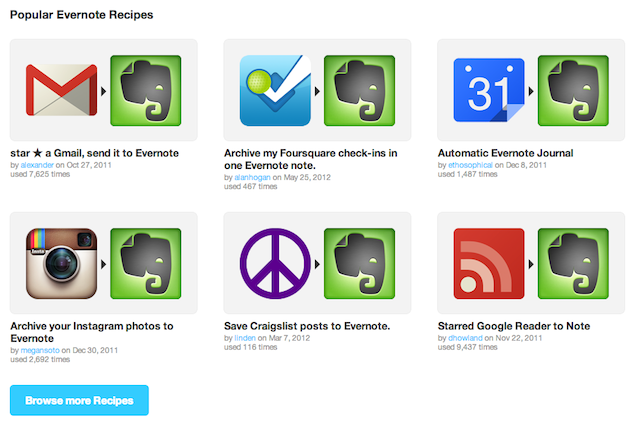
Earlier I spoke of how I use Evernote. I forgot to mention two other ways I use Evernote.
First up... I use the fantastic service over at IFTTT to send content to my Evernote such as links to my Instagram photos and specific emails in my Gmail account.
What is IFTTT I hear you ask? IFTTT is a service that lets you create powerful connections with one simple statement: if this then that.
For example: If I post a photo to Instagram (this is the trigger) then send the hyperlink to Evernote (this is the action).
Evernote is a key channel within IFTTT with loads of different recipes available to utilise. As such... its well worth checking out.
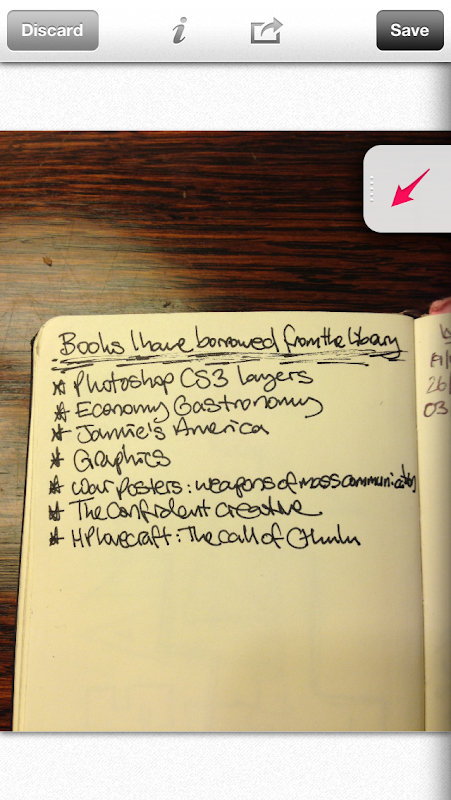
Secondly... I use the Skitch app on my iPhone5 to take photos of my 'pen and paper' notebooks.
I take a photo (above) then crop it and annotate it with some words or tags to make the note accessible.
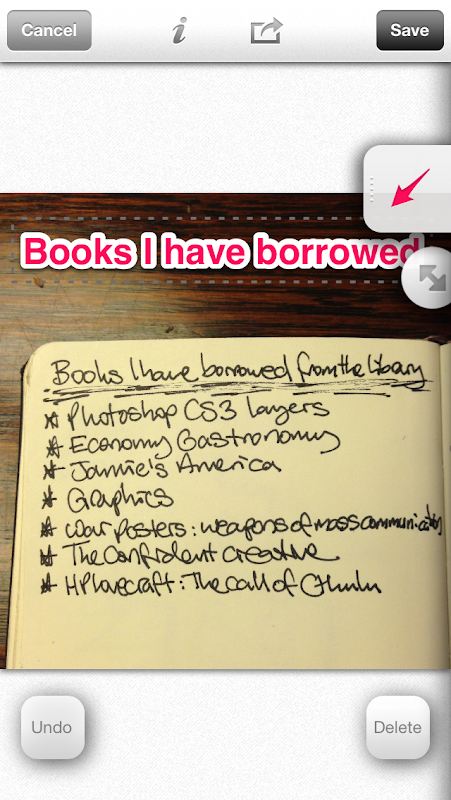
I am then left with usable content (below)... that is if you can read my writing?
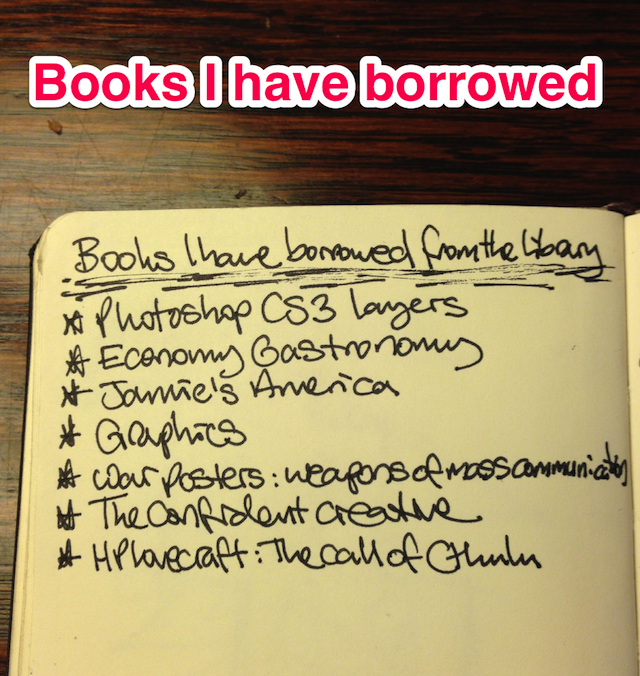
Skitch is a free app and is part of the Evernote toolbox... working seamlessly with the main Evernote app.
Tx
Tapes On Books

I like this idea... create unofficial mixtapes that reflect the story, characters, locations, props etc in classic stories... like "Do Androids Dream Of Electric Sheep?" by Philip K. Dick.
The mix contains tracks from the likes of Kraftwerk, Lambchop, Joy Division, Bob Dylan and Tubeway Army. I haven't heard the mix yet... but really like the idea behind it.
Go here for more :: http://tapesonbooks.wordpress.com/
Tx
Oh and they have a mix for "The Lord of the Rings" too :: Link.
Some thoughts on Evernote
I recently became a premium subscriber to Evernote. Whilst I wasn't really using all my uploads in the free version... I jumped at the chance via the latest MacHeist bundle which, in essence, gave me 15 months worth of Evernote for £18 plus a whole heap of other software and games... including Scrivener, Bejewelled 3 and Radium (a sweet internet radio app that enables me to listen to StillStream while I type).
I use or have used a number of note-taking apps on my iPhones, iPad and MacBook Pro over the years... but nothing has come close to the user-friendliness of Evernote. In fact, I've ported over all my notes from the Apple Notes app and intend to do the same for SimpleNote. I like the fact I have access to all my notes on all my devices.
I watched the video (above) that demonstrates Evernote 5 for Mac... with glee this morning. Yes, I am *that* nerdy. It really looks fab and will hopefully make my Evernote experience even better.
It got me thinking... maybe I should share *how* I use Evernote?
First off... I email everything I want to recall to Evernote. Tweets with links I need to check out later? Emailed. Emails? Emailed. Notes from Simplenote? Emailed. The email facility, whilst not a one-click operation, is fab and most apps allow for emailing out.
Secondly... I use the webclipper which takes a screendump of the page I'm on and creates a note in Evernote. I then add the URL for reference later. This is very handy because the image grabbed helps recollection of the note... I take screendumps of Bandcamp pages, for example - the name of the band and the artwork aid my recall.
Thirdly... via connected apps like Evernote Food, Evernote Hello, Genius Scan and Drafts on my iPhone and Bamboo Paper on my iPad. I now actively look for apps that connect with Evernote.
Fourthly... easy access to my content is key. As such, I have multiple notebooks each on one specific yet large topic - blogs, church, bigbible, music recommendations, scanned etc - and I use metatags to describe the content within the note - blog, review, thoughts, ideas etc. Both the notebooks and the tags make it easy to get to my
Fifthly... I scan pages from my analogue 'pen and paper' notebooks using the Genius Scan app and upload them to Evernote. I could never function without my 'pen and paper' notebooks and use Evernote in conjunction with them.
I don't have an Evernote Moleskine... which adds additional functionality to the page to enable tagging when uploaded... but may invest when my current stockpile of notebooks is used up. I would love a Fujitsu ScanSnap scanner but I don't like ripping pages out my Moleskine notebooks... albeit I could use Rhodia more often instead.
That's me... nothing 'rocket science' about how I use Evernote. Its easy to use and the threshold before you need to upgrade to Premium is significant that you could do quite a bit with it without incurring cost.
For more on how to use it... please check out the extensive notes that Michael Hyatt has posted on his blog :: http://michaelhyatt.com/a-handy-index-to-all-my-evernote-posts.html
Tx
*U*P*D*A*T*E
I've embedded the wee promo video for the Evernote Moleskine below... just to let you see what I'm on about:
Subscribe to:
Posts (Atom)
LinkWithin
