
Showing posts with label Productivity. Show all posts
Showing posts with label Productivity. Show all posts
Friday, November 02, 2012
I'd run out and buy a Livescribe Sky pen except for ...
I'm still nerding out on Evernote at the moment ... and have been hearing good things about the new Livescribe Sky wifi 'smartpen' ... that works with Evernote.
I really like the idea of a pen that captures my notes and can capture audio too ... I really like that idea.
In fact I'd run out and buy a Livescribe Sky pen right now if it wasn't for one key factor ... the paper I have to write on.
Livescribe have their own paper ... it features coding that works with the pen ... start / stop ... that kind of thing. To use this 'smartpen' I need to use their 'smartpaper'.
This is a deal breaker for me.
Why? Moleskines and Post-it Notes ... that's why.
Or I should be less brandy and say ... notebooks and stickynotes.
I currently have 4 notebooks on the go ... 5 if you count my work notebook. None of them have the Livescribe notation. I would have to scrap them if I wanted to use a Sky pen. That seems wasteful to me.
I like my stationery. I like my Moleskine and Rhodia. The Livescribe paper just isn't as good as them.
I also write on Post-it notes. Notes here. Notes there. It would be really cool to record them and have them in Evernote. Really cool indeed ... but I'm not sure Livescribe have their own proprietary version.
If Lifescribe bring out a pen that works (as in records my writing) on 'ordinary' paper then I'll be interested ... until then I'll continue to write/scribble/draw/annotate/underline with my Bic 4-colours ... snap a pic and then upload to Evernote. Slightly cumbersome ... I'll admit ... but it works with what I've got.
The other option would be for Evernote to facilitate a collaboration between Livescribe and Moleskine ... a three way collaboration ... that resulted in a Moleskine notebook that was truly designed for Evernote ... with notes that could be easily scanned on a smartphone or written using a smartpen ... and uploaded.
I guess I can dream ... and yes, these are the things I dream about ... that and an ambient music festival ... but that's for another day.
C'mon Evernote ... get Moleskine and Livescribe talking.
Tx


Evernote 5 for iOS
I am a total Evernote nerd right now and am really excited about Evernote 5 for my MacBook Pro. It's fair to say I was really, really excited to see what they have planned for the iOS version.
I just hope my 1st gen iPad is 'on the list' of supported devices.
Tx
Saturday, October 27, 2012
More thoughts on Evernote
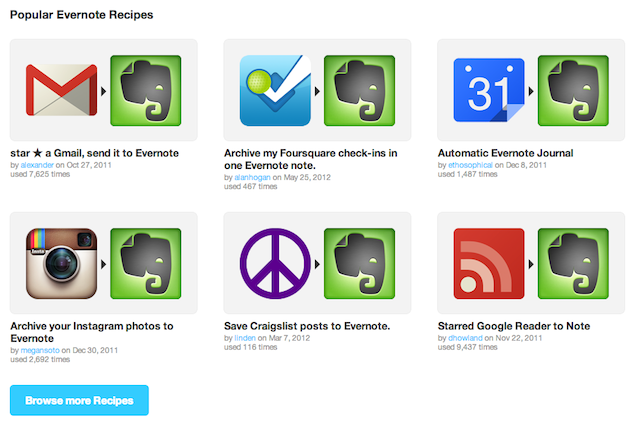
Earlier I spoke of how I use Evernote. I forgot to mention two other ways I use Evernote.
First up... I use the fantastic service over at IFTTT to send content to my Evernote such as links to my Instagram photos and specific emails in my Gmail account.
What is IFTTT I hear you ask? IFTTT is a service that lets you create powerful connections with one simple statement: if this then that.
For example: If I post a photo to Instagram (this is the trigger) then send the hyperlink to Evernote (this is the action).
Evernote is a key channel within IFTTT with loads of different recipes available to utilise. As such... its well worth checking out.
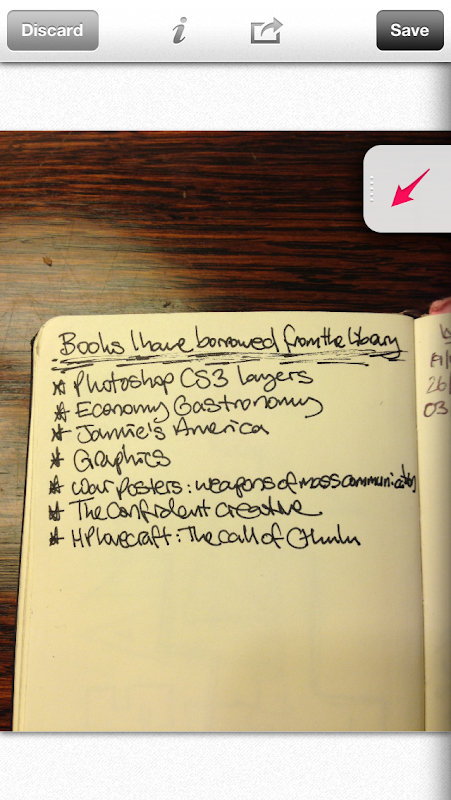
Secondly... I use the Skitch app on my iPhone5 to take photos of my 'pen and paper' notebooks.
I take a photo (above) then crop it and annotate it with some words or tags to make the note accessible.
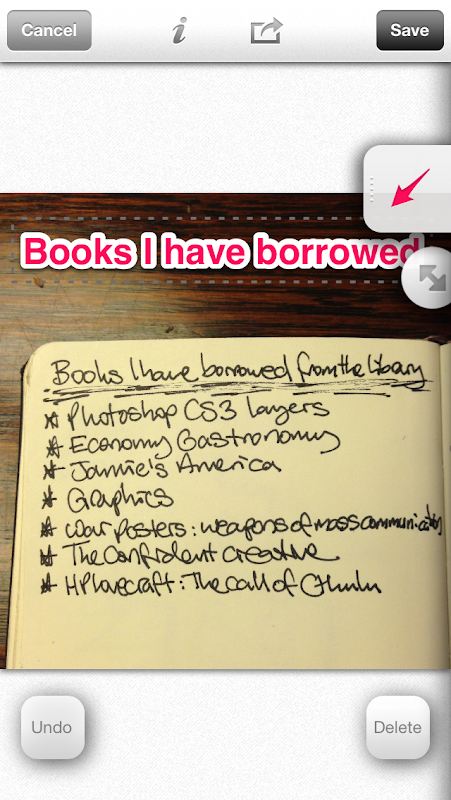
I am then left with usable content (below)... that is if you can read my writing?
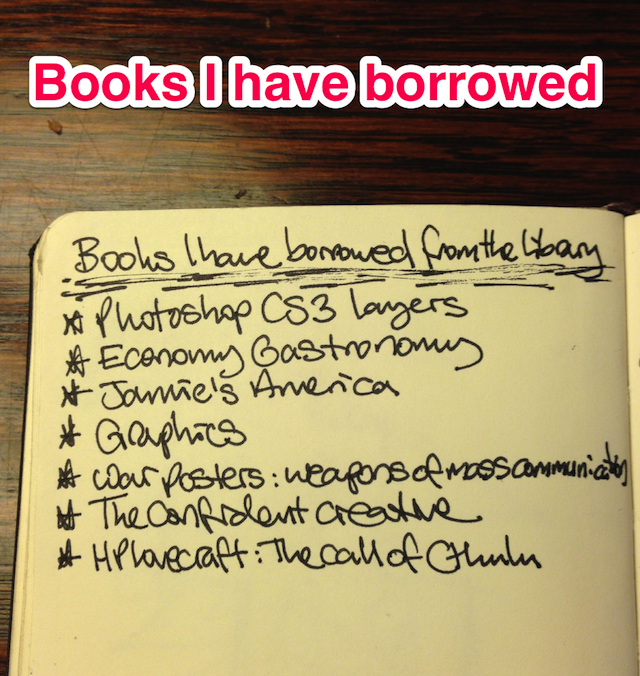
Skitch is a free app and is part of the Evernote toolbox... working seamlessly with the main Evernote app.
Tx
Some thoughts on Evernote
I recently became a premium subscriber to Evernote. Whilst I wasn't really using all my uploads in the free version... I jumped at the chance via the latest MacHeist bundle which, in essence, gave me 15 months worth of Evernote for £18 plus a whole heap of other software and games... including Scrivener, Bejewelled 3 and Radium (a sweet internet radio app that enables me to listen to StillStream while I type).
I use or have used a number of note-taking apps on my iPhones, iPad and MacBook Pro over the years... but nothing has come close to the user-friendliness of Evernote. In fact, I've ported over all my notes from the Apple Notes app and intend to do the same for SimpleNote. I like the fact I have access to all my notes on all my devices.
I watched the video (above) that demonstrates Evernote 5 for Mac... with glee this morning. Yes, I am *that* nerdy. It really looks fab and will hopefully make my Evernote experience even better.
It got me thinking... maybe I should share *how* I use Evernote?
First off... I email everything I want to recall to Evernote. Tweets with links I need to check out later? Emailed. Emails? Emailed. Notes from Simplenote? Emailed. The email facility, whilst not a one-click operation, is fab and most apps allow for emailing out.
Secondly... I use the webclipper which takes a screendump of the page I'm on and creates a note in Evernote. I then add the URL for reference later. This is very handy because the image grabbed helps recollection of the note... I take screendumps of Bandcamp pages, for example - the name of the band and the artwork aid my recall.
Thirdly... via connected apps like Evernote Food, Evernote Hello, Genius Scan and Drafts on my iPhone and Bamboo Paper on my iPad. I now actively look for apps that connect with Evernote.
Fourthly... easy access to my content is key. As such, I have multiple notebooks each on one specific yet large topic - blogs, church, bigbible, music recommendations, scanned etc - and I use metatags to describe the content within the note - blog, review, thoughts, ideas etc. Both the notebooks and the tags make it easy to get to my
Fifthly... I scan pages from my analogue 'pen and paper' notebooks using the Genius Scan app and upload them to Evernote. I could never function without my 'pen and paper' notebooks and use Evernote in conjunction with them.
I don't have an Evernote Moleskine... which adds additional functionality to the page to enable tagging when uploaded... but may invest when my current stockpile of notebooks is used up. I would love a Fujitsu ScanSnap scanner but I don't like ripping pages out my Moleskine notebooks... albeit I could use Rhodia more often instead.
That's me... nothing 'rocket science' about how I use Evernote. Its easy to use and the threshold before you need to upgrade to Premium is significant that you could do quite a bit with it without incurring cost.
For more on how to use it... please check out the extensive notes that Michael Hyatt has posted on his blog :: http://michaelhyatt.com/a-handy-index-to-all-my-evernote-posts.html
Tx
*U*P*D*A*T*E
I've embedded the wee promo video for the Evernote Moleskine below... just to let you see what I'm on about:
Tuesday, February 08, 2011
I need to concentrate… cont (1)

I think this idea on cnet reviews could have potential. I'm going to give it a go tomorrow. Only downsides I see are:
I need to repeat what I've typed into Things
It looks like I'm fidgeting... even though I'm *technically* not.
We'll see if it works.
Stay curious & keep productive
Tx
I need to concentrate…
Here’s a question for you… how do you gain/keep your concentration?
I have a very short attention span. I’m like Doug in ((squirrel)) the film “UP” ((squirrel)). If you haven’t seen the film… and you know you should have… Doug is a dog that talks… and is often distracted by movements and noises. When he is distracted he shouts “Squirrel”. That’s me.
Except the things that distract me aren’t squirrels… although if a squirrel were to appear in front of me whilst I was typing away… I do think it would distract me. No, the things that distract me are Texts... Tweets… Facebook comments… interesting design blog posts… games on "words with friends" and trying to find the perfect song that matches my present mood.
In essence, I am distracted by the “figital” nature of my iPhone4 and my iPods.
I also find instant messaging a distraction… and the ping of an email throws me off course too. Oh and don’t get me started with people… I’m a people person and consider it rude not to respond when I am asked a question.
Whilst the toys maybe new… and the questions are always varied… this isn’t a new occurrence for me – I’ve always had a poor attention span. I wish I could self-diagnose ADHD or something… but I can’t.
So here’s the thing… what do you do to aid your concentration?
I’ve found four things so far that help:
Hopefully, these tips will continue to work for me. But I am eager to hear if you have anything else that may work? Leave a comment or “@” me.
Tx
I have a very short attention span. I’m like Doug in ((squirrel)) the film “UP” ((squirrel)). If you haven’t seen the film… and you know you should have… Doug is a dog that talks… and is often distracted by movements and noises. When he is distracted he shouts “Squirrel”. That’s me.
Except the things that distract me aren’t squirrels… although if a squirrel were to appear in front of me whilst I was typing away… I do think it would distract me. No, the things that distract me are Texts... Tweets… Facebook comments… interesting design blog posts… games on "words with friends" and trying to find the perfect song that matches my present mood.
In essence, I am distracted by the “figital” nature of my iPhone4 and my iPods.
I also find instant messaging a distraction… and the ping of an email throws me off course too. Oh and don’t get me started with people… I’m a people person and consider it rude not to respond when I am asked a question.
Whilst the toys maybe new… and the questions are always varied… this isn’t a new occurrence for me – I’ve always had a poor attention span. I wish I could self-diagnose ADHD or something… but I can’t.
So here’s the thing… what do you do to aid your concentration?
I’ve found four things so far that help:
- Removing all “push” alerts on my iPhone4 or iPad. I keep the badges but not the pings. This helps. It means my electronic comfort-blankets are NOT ping, ping, pinging me all day long… demanding my attention. I go to them when I want to see if there’s anything new… which is far more figital, if I am honest.
- This is where the second aid comes into play… I forward calls from my iPhone4 to my original iPhone. This means I can put my iPhone4 out of reach, physically and mentally, and just have my phone for calls and texts (that reminds me… I need to make sure Olly know this number for texts). My original iPhone has a pay-as-you-go SIM that has a zero balance. This means it doesn’t have a data subscription and, as such, can’t access all the tweets, comments and alluring design posts that act as Sirens enticing me to my productivity doom.
- My last point is music… I am a firm believer in music… its my golf! I find listening to certain types of music helps me to concentrate: orchestral movie soundtracks (especially John Williams & Howard Shore)… long-form ambient electronica… deep ambient techno mixes from mixotic… music that doesn’t demand my attention with lyrics or breaks in theme.
- Setting short-term goals with rewards helps me too: “do this by 10am” or “do that before I have a cup of tea”… these wee challenges keep me active. I might even reward myself with a wee peak at PSFK.com or my iPhone4 if I meet my challenge. Sometimes.
Hopefully, these tips will continue to work for me. But I am eager to hear if you have anything else that may work? Leave a comment or “@” me.
Tx
Subscribe to:
Posts (Atom)
LinkWithin
